Turn a
HP C4103A IrDA
/ FIR adapter into a standard PC IrDA module
(For motherboards with IrDA on-board)
Updated: 12/9/02
How to convert your HP C4103A into a useable SIR, MIR and/or
FIR PC Interface…
Simple modification instructions… assuming you know how
to use a soldering iron, and have a basic understanding of electrical
components…
Email me with questions and comments
IrProject@chrisalley.com
or just let me know what you think…
Please feel free to link to this site!
**Updated** Conversion FAQ
New info on the LED Issue: Something gets real hot! What went wrong?
Adding FIR functionality to the device (experimental)
See HP C4103A Design Layout for Part Reference
| Advertisement: |
| Fun and colorful cellular phone accessories such as flashing batteries,faceplates,booster, flashing antennas and more. |
| Buy some cell phone accessories from CutePCS to help me get out of debt!!! |
| If you have a motherboard with built in IrDA, but no Ir module then this may solve your problem for free… These IrDA adapters from HP came with every laserjet 4050 we bought recently, so we had a bout 10 or so to experiment on… They don’t send them with the printers anymore, you have to send off the request card in the box to get one, they used to be free, but I’m not so sure anymore… eBay’s Half.com - Buy and Sell More Half.com has the HP C4103A for $10 to $20 So far, it has worked great to sync my Nokia 3360 phone and my Jornada Pocket PC… (which is better than its career as a printer adapter… I never got it to work) |
Even though the HP plug looks kinda like the one on the Asus connector, DON’T TRY TO CRAM IT IN THERE, it will blow a fuse, if not make something smoke!!!!!
You might as well cut the plug off now, as it is of no use…
I have the cord running in through an open expansion slot, and connecting straight to the motherboard…
You will need to find the pin out of the IrDA connector for your motherboard, for reference I will use the asus connector block (most will be very similar) To find your pin-out of your motherboard check the website of its manufacturer… or Contact me for other motherboard pin-outs
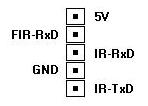
The reason we need to modify the HP adapter is that it uses a differential Tx
signal ( Tx+ and Tx- )…
For IrDA both signals are just 1 wire each (ignore the FIR-RxD)
For a better explanation see the pages by Ralf Probst & Andreas Schüßler
Here it is in 5 easy steps:
click on images for full size shots
| 1) Remove Screws - First punch 2 holes in the label on the bottom with a pushpin or small screwdriver… *Some have 4 screws, Check the round little rubber feet for more… | |
| 2) Attach a Jumper - Find a 1.5 inch scrap of wire (I use one of the wires from the LED, the wire is the perfect length, and leaving these wires connected may cause something to get hot or smoke! - see FAQ-Questions 4 & 5 ) solder your scrap to RX1 closest to the IR module (if you follow this trace it goes to pin 7 of the IR module, but its easier to attach it here if your not very good with a soldering iron) ** As mentioned above, the LED may cause problems, so go ahead and clip both wires at the board, unless you want to do some testing on it for me… | |
| 3) Remove pink wire from connector block and strip it enough to solder or twist on the other end of your scrap… (see finished images 1 2) | |
| 4) cut off original connector… you can use a CDaudio patch cable with its 4 block connector (cut the patch cable in two, and splice the Tx/GND/Rx in to one half… cut all but one wire out of the other and splice it to the +V)… you can use a paperclip or knife to pry up the plastic clip and remove the crimped connector… I’ll have pictures soon… | |
| 5) Reassemble and Enjoy I’ve had several people ask me how to install drivers for IrDA ports… but… I’ve had no trouble with my ASUS board, once I enable the IrDA function in the bios Windows (98, 2K & XP) finds the device and installs default drivers without any help from me… |


Email me with questions or comments IrProject@chrisalley.com
If you appreciate the information I have provided, feel free to send me a donation via PayPal… I will provide as much help as I can if you do… Or just email me and I’ll probably help you for free anyway…
Please feel free to link to this site!
Credits:
Special thanks to
Ralf Probst &
Andreas Schüßler who did all the hard work
and research here, check out their work:
Schüßler
Asus TX97-E
Infrarotprojekt von Andreas Schüßler
translate with google
Probst:
HP-IrDA C4103A an
Asus Mainboards Infrarotprojekt
translate with google
Dschen Reinecke’s Infraredport-page! ( www.infraredport.com for English / www.infrarotport.defor German )
I found that translating technical instructions from German is very difficult (and some errors are quite funny) that’s why I’m doing an English page..
I thank all of you who have emailed me with questions and praise… Your questions keep me thinking about this project and updating it when ideas and problems pop up… Please let me know if you got it working and how you did it…
Other Languages: (these sites have links to this page)
Hebrew: HWzone (looks like a message board, I have no idea what it
says)
http://www.hwzone.co.il/community/index.php?board=1;action=display;threadid=14647;start=0
Russian: ??? (another message board, again I have no idea what it says)
http://forum.ixbt.com/0013/018753.html
Email me with other C4103A sites or boards and I’ll add them here.
| Advertisement: |
| Buy some cell phone accessories from CutePCS to help me get out of debt!!! |