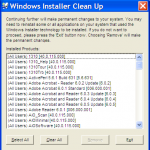
 If you’ve ever seen the error: “The feature you are trying to use is on a network resource that is unavailable”, you’ve probably had to use the Windows Installer CleanUp Utility. Unfortunately, it looks like MS has removed all traces of this utility. It was retired by Microsoft on June 25, 2010, due to conflicts with Office 2007. When you follow any link to MS KB article 290301 it takes your to a newly updated one that offers the “Microsoft Fix It” utility… but ONLY for MS Office.
This article previously contained a link to the Windows Installer Cleanup utility (MSICUU2.exe). If you were directed to this article to solve a problem installing a product other than Microsoft Office, please contact your software manufacturer for installation support on the product.
While the Windows Installer Cleanup utility resolved some installation problems, it sometimes damaged other components installed on the computer. Because of this, the tool has been removed from the Microsoft Download Center. The Fix it Solutions in this article provide the ability to fully remove Office 2003, 2007 and 2010 suites without damaging other Windows components.
So, they assumed that this utility must have only been used to fix office installations. Though, having encountered this problem in the past, it was usually with office.
A friend of mine is trying to upgrade to iTunes 9.2 but keeps getting that error… and contacted me for advice. But I don’t think the new “Microsoft Fix It” utility will do the trick for iTunes. Their answer to all other issues: contact your product manufacturer for support. Gee, thanks!
UPDATE: After doing some searching, an article on MS clubhouse (really?) says that MajorGeeks still has the utility in question. Windows Installer Cleanup Utility Retired
Although Major Geeks is still hosting the Windows Installer Cleanup utility, the use is at your own risk since Microsoft no longer supports the utility.
So, go download it while you still can! However, be careful not to fall for the myriad of “Download Now” links that have nothing to do with MSICUU2.exe. Follow this link and click on the link that says: Download@MajorGeeks under Download locations. (since Download@Author’s site obviously won’t work)
Clubhouse Article: http://clubhouse.microsoft.com/Public/Post/3d3db81c-a4a7-4d34-869e-a5a95714baa7
MajorGeeks download page: http://majorgeeks.com/Windows_Installer_CleanUp_Utility_d4459.html
Apple Post on the subject: http://discussions.apple.com/thread.jspa?messageID=11809534�