Well, we had another failure late last month. The rebuild went fine… and quickly since I had another disk on hand. That disk was supposed to be replace the other disk with bad blocks. But I’ve been to busy and a little too trepidatious to break the array since its running fine and not complaining. We have backups… I just didn’t have the time to rebuild all that. After all, we’ve had 2 failed disks in our PS6100 over the last 3 months.
We just picked up a 2nd PS6100 and spent the last week moving volumes to the 2nd array. So, now I feel comfortable breaking things. And dell is going to bill us for the other drive if I dont send the bad one back soon.
But, which disk was it again? I had notes of the conversation with EQL support, but I didn’t write down which one had the bad blocks and high error rates. And the GUI wasn’t helpful at all… it showed all driveds with no errors.
The only way to know for sure is to check on the console or terminal. Now, I had some notes on unsupported bash commands, but nothing was working.
SAN> su exec bash
You are running a support command, which is normally restricted to PS Series Technical Support personnel. Do not use a support command without instruction from Technical Support.
…but thats all it did. It didn’t start bash, it just dumped me back to the same prompt. Nor did it allow any special commands. After trying a few things, eventually found that just “su” will get you to a support prompt:
SAN(support)>
“exec bash” still didn’t do anything. But ? gives a list of commands…
I want to run diskview… but it still complains:
SAN(support)> exec diskview -i 0

Error: Too many parameters
So, its running exec and sending all the parameters. Heres what I eventually did…
exec "diskview -i 4"

Analysis of drive 4:

Approved drive by, signature .

The drive has had 583410022 IOs issued to it and 37 errors. Access based on percent region of the drive below:
 0 - 25 : 43.3(252907936) percent(Count) / 8.1(3) Error percent(Count).
 25 - 50 : 50.8(296230990) percent(Count) / 91.9(34) Error percent(Count).
 50 - 75 : 3.5(20319965) percent(Count) / No Errors.
 75 - 100 : 2.4(13951131) percent(Count) / No Errors.

Current Preemptive removal status is: Drive remove has been requested.
That confirms #4 is our bad drive.
Though im curious about the “Preemptive removal status” part… I mentioned on the initial call that I was nervous about pulling the drive, but the tech said that was the only way. However, I though they should have a preemptive removal function that would prematurely start a rebuild with all disks still available. Drive 4 still had 99% good sectors… I’d rather rebuild without affecting the physical disks. And if the rebuild fails, we could loose data and I’d feel 100% responsible.
Detailed error history(upto the last 10 errors): 37 total errors have been logged for this drive.

        At local time of Fri Jan 11 22:27:42 2013
                A Read at LBA 1176596223 for 1 blocks,
                 with a IO Error(0x5) error with a sub error of Uncorrectable error(0x4)
                (ASC/ASCQ(0x11/0x1) = Read retries exhausted)
                and a recovery time of 1 seconds.
            Special actions taken during error recovery:
                1 bad blocks were returned to raid.
                This IO required 1 retries.
                An error was returned for this IO.
thebn finally:
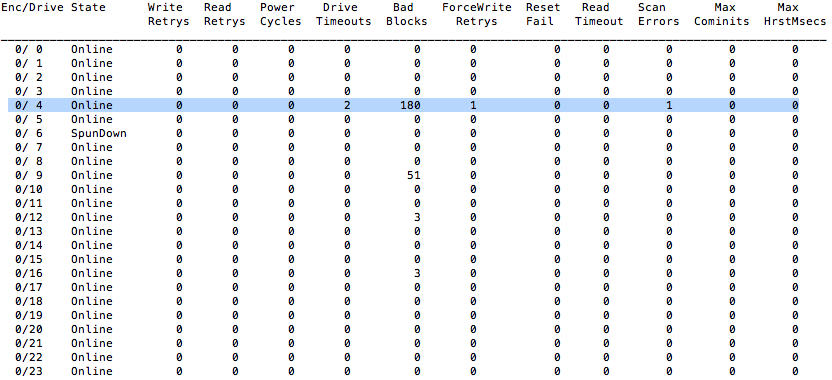
exec "diskview -j"
shows us this table:
Ultimately, the rebuild went fine and was back to 100% by late saturday night. I changed RAID from 50 to 6 shortly after and it took much less time than I had figured. And we havent seen any noticeable hit to performance.
Here are some of my search results that were helpful:
http://www.cupfighter.net/index.php/2010/04/undocumented-equallogic-cli-commands-part-ii/